
My First Impression Of Sonic MyDVD
Updated 06/19/2005: I recently posted part 2 & 3 of this post.
Ever since the birth of my son, I thought it would be neat for me to create a collection of Thomas The Tank shows. In my area, Thomas the Tank is only aired twice a week. Therefore, I thought it would be nice to have a collection so that we can pop the show in whenever WE want him to watch it. I emphasized we because I don’t want you to think that I just plan on planting my son in front of the TV.
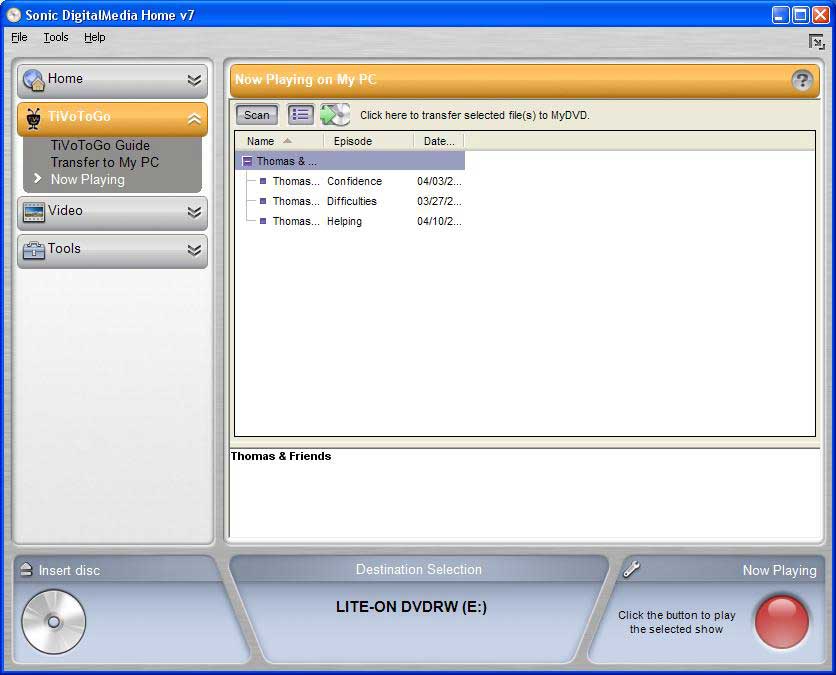
That being said, I’ve setup a season pass for Thomas & Friends. Now that I have four shows recorded and transferred to my PC using TiVoToGo, I went ahead and purchased a copy of Sonic MyDVD. The software only cost $49.99, which I consider a fair price.
(click for larger image)
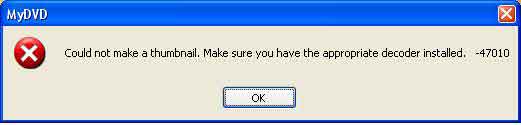
Could not make a thumbnail. Make sure you have the appropriate decoder installed. -47010
(click for larger image)
Any experienced Windows user knows that whenever they get the feeling that something isn’t right, the next steps to take is stop what you are doing and uninstall, reboot and reinstall. Sure enough, that’s what I did and everything just started to work :o. Don’t ask me why, I’m just happy that it works now. I hope that I won’t run into the same problem in the future. If I were a betting man, I would bet that it will happen again however; for the time being I don’t want to think about it :). I’ve been around computers long enough to know that sometimes you just say “screw it” and accept the fact that you don’t know why something didn’t work. This is definitely a case where I am going to throw in the towel and hope that it doesn’t happen again.
Ok, now that I have everything working I might as well talk about what I do like in MyDVD. Once I imported my TiVo files I was rather impressed by how MyDVD automagically generates a menu with each show as a thumbnail. I’ve some what customized the menu to include my own text including a better description of each show. As of right now, I haven’t gotten much farther then that. I was about to try and edit the actual scenes in the DVD however; my son started to cry. I hope to actual finish editing the DVD and eventually burn it to disc in the near future. I’ve read on a number of sites that transcoding the DVD takes a long time. I’m sure that it will be especially slow on my 800mhz pc.
Check back in the near future for my complete review of MyDVD including my analysis of the editing process. Hopefully I will have something up in the near future!
Updated 06/19/2005: I recently posted part 2 & 3 of this post.


April 23rd, 2005 at 8:50 am |
I gave up on MyDVD altogether. I don’t have time to put up with all the bugs. The main problem I had is that it would not recognize the disk I had in my DVD recorder. I would hope that Tivo would partner with someone more reliable like Roxio.
April 24th, 2005 at 6:26 am |
Unfortunately, Sonic does own Roxio
http://www.roxio.com/en/company/news/archive/prelease080904.jhtml
May 3rd, 2005 at 5:11 am |
[...] tomize it to my liking. To start, I imported four Thomas and Friends episodes into MyDVD (this is where I ran into problems before). The import [...]
May 8th, 2005 at 6:43 am |
[...] it doesn’t take nearly as long as it did before. Also, I didn’t run into the thumbnail problem that I had with MyDVD before. I was [...]
October 8th, 2005 at 9:03 am |
I managed to fix the thumbnail decoder error on my computer after having no luck with any of the suggestions from the sonic site or other forums. I noticed that when importing an mpeg, the matroska vsfilter was being loaded (system tray), and then I remembered that I had changed a setting in the vsfilter to “always load” instead of “load when needed”. After changing it back, problem fixed.
April 10th, 2006 at 10:28 pm |
I cant uninstall/reinstall because it come preinstalled with my pc. I HATE THEM!
April 11th, 2006 at 5:46 am |
Justin,
I would think that you should still be able to uninstall it. I know that Dell gave me all the software that was installed on my computer on CDs.
May 17th, 2006 at 9:43 am |
Mine did not come with a CD, so I can’t reinstall it. I am running into the whole Thumbnail problem too. Say I downloaded a TV show episode that is in Xvid format, should I be able to import it? It gives me that Thumbnail error and I have no clue how to fix it.
August 14th, 2006 at 11:07 am |
sonic was installed on my laptop when i got it. i didn’t think it would be such a problem that they didn’t give me the dics of the installed software on my pc.. but at times like these… AAAAAAARGH
i have been on the computer for hours trying to find a solution to this. i want to download these episodes (Xvid) using Sonic MyDVD… the program the laptop came with.. and that stupid error msg came up about codec 47010… burning episodes/movies is the only reason i need a burner… this completely renders the whole DVDburner program on my pc useless.
i’ve searched many many sites. apparently this is a problem that ALOT of users are experiencing. at first, i would’ve thought i would find the codec i need on the net somewhere and just download it and everything would be peachy… but it seems like i can’t??
i’ll continue trying… if nothing works, i swear i’m going back to Nero.
what a pooper… i was really excited to use Sonic.. it’s GUI was nicer and everything… ahhhh!!!
August 14th, 2006 at 11:08 am |
correction:
“i want to BURN these episodes (Xvid) using Sonic MyDVD… the program the laptop came with.. “
August 27th, 2006 at 3:48 am |
uninstall any codec pack such as klite and reinstall klite codec pack standard! nothing above that!
August 28th, 2006 at 12:14 pm |
Has anybody found that this “fix” worked for them?
November 24th, 2006 at 3:02 pm |
The klite suggestion didn’t work for me. I plan on calling sonic on Monday because this is ridiculous.
February 6th, 2007 at 7:38 am |
Something else to try.
Remove most of your codecs.
Go here = http://www.codec-download.com/modules.php?name=Downloads&d_op=getit&lid=486
Run file.
When insatlling under special features click XviD-1.0.2 Final
Then try burning your file again
Work for me
February 23rd, 2007 at 1:48 pm |
Hey, I HAVE SOLVED YOUR PROBLEMS!!!!!!
Make sure you have the latest version of DivX installed, 6.5 I believe, and then do the following, which I quote from a forum on DivX’s website:
“I think this may be due to the advanced hardware overlay, which DivX Codec 6.5 now enables by default on installation in order to make functional several new features. You can try turning it off in the Decoder Configuration Utility accessible from the DivX programs group on your Start menu, or else assuming you have installed the update patch here:
forums.divx.com/forum/viewTopic.php?id=3156″
I had to become a member to get onto the forum, but it was well worth it. I just hope nothing goes wrong in the burning process. *Knock on wood*
February 27th, 2007 at 2:14 am |
Mike,
Thank you so much for helping with this problem, it has been driving me mad but works fine now!
Great solution,
Cheers!!!!
March 4th, 2007 at 9:06 am |
I’VE GOT THE ULTIMATE EASY SOLUTION!!!
only download and install XPCODECPACK
http://www.xpcodecpack.com/
March 18th, 2007 at 1:00 pm |
I have installed the XCODECPACK, but I’m still getting the “could not make a thumbnail… 47010″ message. Should I uninstall the K-Lite Codec Pack 2.84 Full codec? Or perhaps upgrade Sonic MyDVD?
April 15th, 2007 at 1:32 pm |
I’ve managed to resolve this by installing the DJBCP Codec Pack. Not sure if this will work the same for you. Check out how I did it.
May 27th, 2007 at 5:31 am |
Mike - you’re a genius! Thanks. Doubted it would work, but hey presto…
Thanks again.
June 4th, 2007 at 12:03 pm |
Mike! your amazing! thank you so much! i can go ahead and make my pure ownage Dvd now!
June 9th, 2007 at 6:54 pm |
I don’t get why it’s not working for me!!
UGH!!
Do I have to only install ONE of these things?
Cuz I tried doing what Mike said, but it’s not working, and I tried the XPCODECPACK and nothing worked… and I tried the DJBCP Codec Pack, and that didn’t work either. I’ve like tried EVERYTHING and nothing’s working!
Would it be some function that’s checked off that shouldn’t be? :S
PLEASE get back to me asap!
This Sonic crap is really starting to piss the living daylights out of me!!
June 30th, 2007 at 2:58 pm |
for anybody thats still struggling the XPCODECPACK works a treat!!!! thanks “spinners”
July 4th, 2007 at 5:52 pm |
Thanks alot Mike!!!, great job on finding the solution….actually worked, thanks again!!!
July 7th, 2007 at 1:53 am |
Mike’s solution also worked for me- so easy
July 18th, 2007 at 7:48 am |
Thank you mike worked like a dream!
August 4th, 2007 at 12:30 am |
OHHHH GOD!!!!!!! mike…. thanx……….!!! thanx so much……… ahaa…. everything in place… PEACE OF MIND…!!!
cheers dude..
ur the best in business…
August 19th, 2007 at 1:16 pm |
0mg Mike thx! that solved my problem with the decoder thing, thx tons tons!
August 23rd, 2007 at 10:21 pm |
Mike, thank you so much. You fixed my problem. =) I hope you live a long and happy life =)
August 30th, 2007 at 6:04 pm |
Mike’s solution IS THE ONE! WORKS GREAT NOW!
November 13th, 2007 at 6:26 pm |
Mike, thank you so much this fix worked perfect, again thank you. Take care.
Peace To All.
December 17th, 2007 at 4:05 pm |
THIS IS THE ONE THAT WORKED FOR ME!!!
i tried the other suggestions after trying everything else i knew, and some of the other suggestions in here…real glad they worked for you guys, but THIS is the only one that stopped me pulling all my hair outta my head…thx blewer!!!
blewer says:
February 6th, 2007 at 7:38 am |
Something else to try.
Remove most of your codecs.
Go here = http://www.codec-download.com/modules.php?name=Downloads&d_op=getit&lid=486
Run file.
When insatlling under special features click XviD-1.0.2 Final
Then try burning your file again
Work for me
January 22nd, 2008 at 2:23 pm |
Mikes suggestion works perfectly.
just go in to the start menu… XivX… DivX Codec… Decoder Configuration Facility. Then just Uncheck the “Use Advanced Hardware Overlay” in the video settings.
quick fix works fine
January 23rd, 2008 at 2:59 am |
This thread should be renamed the “Mike is a genius tribute thread”
Thanks Mike!!
January 23rd, 2008 at 5:51 am |
Or, you we could rename it to, Sonic Should Hire Mike :). Glad it was a help….
March 8th, 2008 at 8:43 pm |
wow thanks so much mike!!!!